Guide
Hijacked mod account? What to check first
A hijacked mod account looks like one of your own. What Power Horse still catches, the gap it doesn't, and the roles, 2FA and plan that are on you.
A hijacked mod account looks like one of your own. This post covers what Power Horse still catches when that happens, the gap it doesn't, and the role, 2FA and plan work that's on you.
Not a raider. Not a bot. One of your own.
Say a mod's account gets phished on a quiet Tuesday night. Same name, same role, same face your members have trusted for months. Then it starts posting a "claim" link in every channel it can see.
Nobody questions it. Why would they? It's a mod.
It isn't hypothetical. In May 2025, a contracted moderator's account in Ledger's Discord was compromised and used to post scam links asking members to "verify" their recovery phrase. Members said it muted and banned people who tried to warn others (The Block). In October 2026, the Discord of the Terraria mod Calamity, with over 250,000 members, was taken over after its owner was talked into giving access to two people posing as former moderators. Within an hour it was spamming a crypto coin (Kotaku).
This is the attack I think about most, because almost everything we build for members assumes your staff are the good guys.
What Power Horse does with staff links
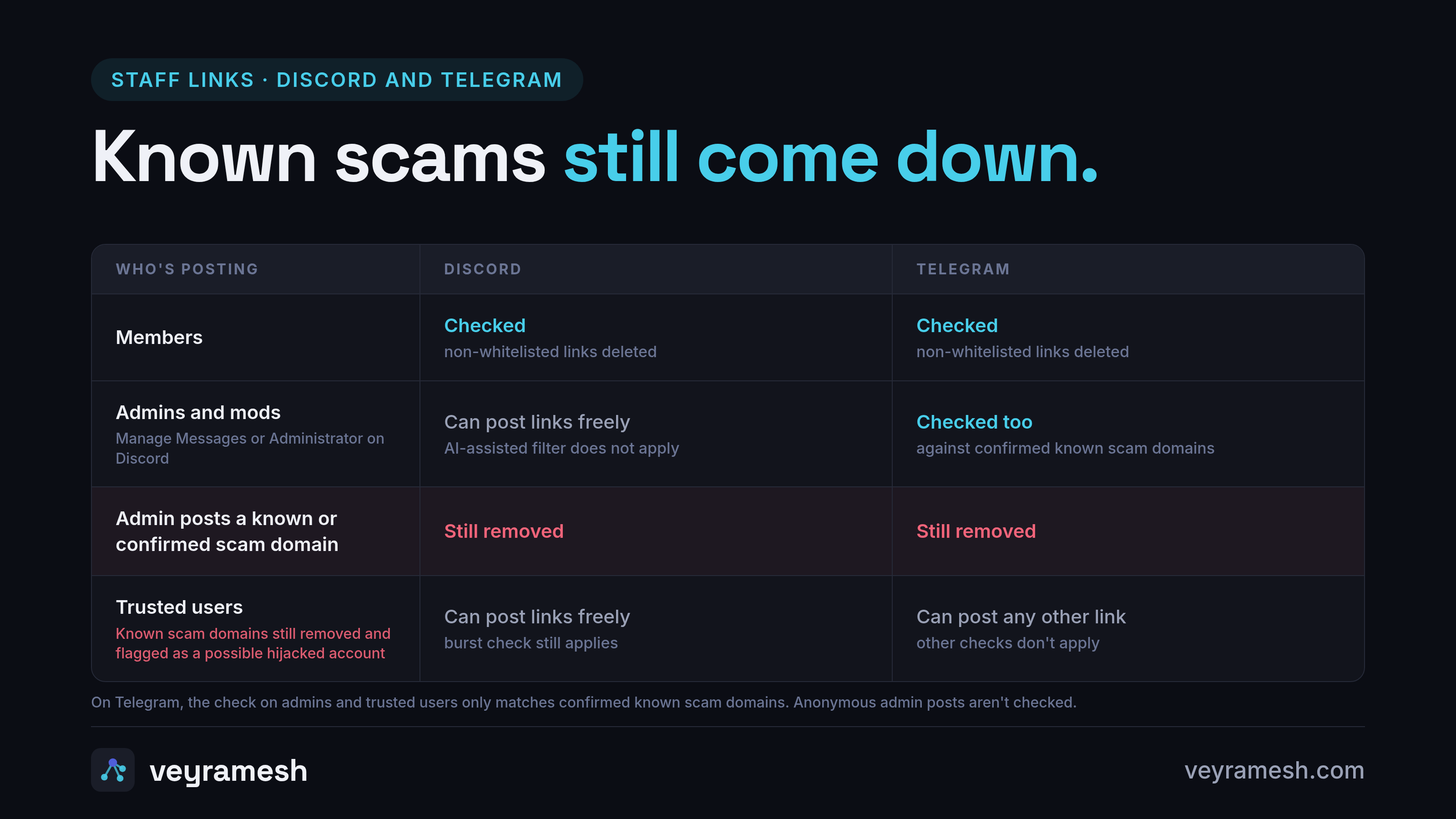
On Discord, anyone with Manage Messages or Administrator can post any link except known scam domains, and the AI-assisted filter doesn't apply to them. Mods share links all day, and a bot that keeps deleting your own team's posts gets switched off fast.
If the domain is a known scam domain, or one that's been confirmed as a scam, Power Horse still removes it. Even from an admin.
So a hijacked mod account can't spray known scam links around your server. Each of those removals is flagged to your team as a possible hijacked account.
On Telegram, admins and Trusted users can post any link except known scam domains, which are still removed and flagged as a possible hijacked account. That check only matches confirmed known scam domains. One exception: posts made anonymously as the group, or auto-forwarded from a linked channel, aren't checked at all. Keep the list of people who can post that way short.
For how link filtering works, how to set the whitelist and who counts as a trusted user, see the moderation docs.
https://veyramesh.com/docs/moderation
https://veyramesh.com/docs/moderation#trusted-users
The honest gap
Here's the bit I won't gloss over.
On Discord, a brand-new scam domain that nobody has flagged yet isn't on any list. Posted from a real mod account, it gets through, because staff can post links that aren't already known as scam domains. The check for one post pasted across several channels won't catch it either, because it doesn't cover staff.
That's a trade we chose. Checking every staff link like a stranger's would make the bot miserable for the people running the server.
So the rest of the defence sits with you, and most of it happens before anything goes wrong.
Fewer keys
Open your roles today and list who holds Manage Messages and Administrator. Then ask, for each name, whether they actually need it.
Least privilege, every time. A mod who deletes messages and times people out doesn't need Administrator. Whoever posts announcements doesn't need ban rights.
Your everyday account shouldn't be the one holding Administrator.
Clean up when people step back. An ex-mod who still has the role is a trusted account nobody is watching.
2FA, and where it stops
Every staff account should have 2FA on. On Discord, the owner can make it compulsory: Server Settings, then Safety Setup, then "Require 2FA for moderator actions". You need 2FA on your own account first. If you can, use a passkey or security key; Discord calls them phishing resistant.
It won't stop a stolen mod account posting, though. Sending messages and @everyone aren't on Discord's list of permissions that need 2FA.
On Telegram, staff should turn on Two-Step Verification: Settings, then Privacy and Security, then Two-Step Verification.
2FA protects a password. It doesn't protect a session someone has already stolen. That's what QR-login and "add this app" scams go after. On Discord, Power Horse removes QR-login and "add this app" links, even when discord.com is whitelisted. It can't see DMs, though, and Discord says that's where the QR-code scam usually arrives.
Tell your staff plainly: Discord's QR scanner is only for logging in. If someone sends you a code to scan or a file to run, the answer is no, however official it looks.
When it happens anyway
Have the plan before you need it. Who can strip a role in the middle of the night? Who holds the owner account, and is it locked down harder than any other account you have?
If a hijacked account is part of a wider wave of new joiners, raid panic mode helps buy time, on Discord and Telegram. It's off until an owner or admin switches it on. When a sudden wave of accounts joins, you get a "Raid detected" alert and the new joiners are held: timed out on Discord, unable to verify on Telegram.
Raid panic mode doesn't remove anyone. The point is buying admins time to look.
Then pull the role and secure the account. On Discord, changing the password logs out every device; then remove any Authorized Apps you don't recognise. On Telegram, end the other sessions under Settings, then Devices. Then tell your members what happened. Fast and plain beats polished and late.
Where it's at
Staff accounts are the most trusted accounts in your community, which makes them the most valuable ones to steal.
Power Horse keeps removing known scam domains, even from admins, on Discord and Telegram. The rest is roles, 2FA and a plan.
Everything is free until 31 December 2026. On 1 January, communities already on Veyramesh get a 14-day Pro trial automatically.
If you run a Discord or Telegram community, check your roles before you check anything else.
Add Veyramesh to your community
https://veyramesh.com/docs/moderation#raid-panic-mode
https://veyramesh.com/login